Jacob Andreas:
LBNL Summer Internship
-
RPP Ordering System
Summary: As part of their upgrade of the software used to assemble and distribute the Review of Particle Physics, the Particle Data Group at Lawrence Berkeley National Laboratories is redesigning online ordering system used to request copies of the Review. The system must be capable of recording contact information, including addresses, telephones and email addresses, for all users, and record from year to year which publications users have subscribed to. From an administrative standpoint, it must also be capable of sending bulk emails to all users and determining which of those email addresses are no longer valid; additionally, it must generate TeX or CSV files suitable for producing mailing labels.
Existing implementation: The ordering system currently exists as a collection of perl scripts processed through CGI. While still effective, these scripts are poorly documented in places and generally unmaintainable, and must be replaced with a better structured, more robust web application.
Even more problematic is the format in which the user records themselves are stored. All information resides in a single flat file some 27,293 lines long, containing, variously, colon-, tilde- and period-delimited fields. Because of the flat-file format, concurrent writes are impossible and only one user is permitted to edit the database at a time. Naturally, this introduces an enormous performance bottleneck, particularly in light of the fact that most users attempt to update their records at the same time, when a new publication is released by the PDG.
My project with the Particle Data group consists of two distinct tasks: (1) migration of the existing records to a PostgreSQL database, and (2), design of a new online ordering system. Each of these projects is described in greater detail below.
Overview
-
Migration from flat-file database to PostgreSQL database
parse-legacy-db.py
Usage:
./parse-legacy-db.py <dbfile>Takes as input the path to a flat file formatted like the pdgmail "database", and transfers the records to the PostgreSQL server on pdg0.
Migration between database formats, even ones as different as the flat file and PostgreSQL database used in this case, would ordinarily be a straightforward undertaking. What makes the job complicated in this case is the fact that there does not exist a simple one-to-one mapping between the fields of the old file and columns in the new database. Records from the old database, a single table, are now distributed between the
person,person_sub_typepub_type,pubandorderstables.The old
namefield is now separated intotitle,first_name,middle_nameandlast_name; similarly, the oldaddressfield becomesstreet_addr1,street_addr2,street_addr3,city,state_provinceandzip_postal_code. Given the almost completely unstandardized format of these fields, the process of parsing them out into columns is, in the words of an old professor, "highly nontrivial", and involves a great deal of guesswork and occasionally luck. Specific descriptions of the process for parsing names and addresses are given below.Names: We start by comparing the first word of the name to a list of known titles; if a match is found, the title field is populated and the title removed from the name, otherwise, the name is left as normal and the title field set to null. Note that looking for known patterns is the only way of reliably extracting the title, as there is no way of syntactically distinguishing between "Dr Pat Choi" and "Mo Ashley Lancaster" (as we will see, this problem occurs on a much larger scale when parsing addresses, and is resolved similarly). Once a title has been removed, we assume that a single-word name is a first name, a two word name has (first name) (last name), a three word name has (first name) (middle name) (last name), and a name with more than three words has (first name) (middle name) (last name 1, last name 2...).
There are a few things to note here. First, priority in long names is given to the last name field rather than the middle name field because of the practice, common in many Spanish-speaking countries, of keeping both parents' surnames without hyphenating them. Observe also that the system is utterly helpless with regard to Chinese names, which appear in (first, last) and (last, first) order with equal frequency. Take for example "Chen Yi Xin", whose name could be parsed: (Chen Yi Xin), (Chenyi, Xin), (Yixin, Chen), or even (albeit uncommonly) (Chen, Yixin) or (Xin, Chenyi)!
Addresses: The address parsing process is considerably more complicated, owing to the greater number of fields, and the greater number of permutations in which they can appear. Because it is virtually impossible to predict a word's or words' role in the address based on its position alone, we must resort either to sophisticated artificial intelligence, or to a prepopulated list of known place names. I have opted for the latter approach. Fields are extracted in the following order:
- Country
- Postal code
- Province
- City
- Street Address 1
- Street Address 2
- Street Address 3
Note that the country is redundant and the postal code occasionally so (each has a dedicated field), but they must be identified and removed anyway in order to successfully parse the other fields. Country and province are identified by searching prepopulated lists of names (in the case of provinces, a list of common abbreviations is also searched), and postal codes are identified using a list of regular expressions. It is occasionally necessary to know the country in order to search for the province — otherwise, tokens that are ordinary words in one language are parsed as provinces in another country. (The Portugese and Spanish "de" is particularly problematic: a naive search turns up many addresses from "Rio Janeiro", in the Brazilian state of Delaware.)
The city is taken to be whatever remains of the last line, and the remaining lines are placed sequentially into the street address fields. When more than 3 lines remain, they are combined: first by doubling up "Street Address 2", then by packing all remaining lines into "Street Address 3".
Based on a spot check of the first few hundred entries, I estimate the accuracy of the address parser to be somewhere between 93% and 97%.
Other concerns: In the old system, a user was identified exclusively using a 10-digit, automatically-generated "password"; while they were also asked to enter an email address at login, this was never actually used as part of the authentication process. Obviously, the system relied on the uniqueness of the passwords to correctly authenticate users, but as a result of some unknown accident, there are actually several collisions among the passwords.
Under the new scheme, users identify themselves with both an email address (for encoders, a username that may or may not be an email address) and a password, and we would like to use email addresses as the primary identifiers when importing records from the legacy database as well. In other words, for each entry in the flatfile, we wish to create a new user account (i.e. an entry in the
persontable) using the old record's email address as the userid and preserving the password. This works for the majority (~22000) of the records. In the remaining records, the email address field is either blank or not unique. Blank-email records are supplied with a new username consisting of the old "record_id" (also not unique) concatenated with a random three-digit nuber. In the case of non-unique email addresses, we populate the person and subscription tables with the information from the last entry with a given email address, but associate that person with orders from any entry with the same email address. -
Online ordering interface
The Particle Data Group's online product ordering application provides a centralized set of web-based tools for managing subscriptions to the Review. It consists of two interfaces: a public interface for use by subscribers, and an adminstrative interface to be used by members of the PDG.
-
User interface design
The PDG Ordering System has two different interfaces for its two modes of operation: registration and confirmation. While the underlying behavior for each of these modes is essentially the same (they are backed by the same ActionBean; see "Settings Management"), the task performed by the user is quite different. During initial registration, the system has no information about the new user, and they must fill in along form containing all of their contact details and subscription preferences. The registration interface must accordingly make the process of entering all of this information as simple as possible. For returning users, by contrast, the user will rarely change any of the stored information, and all they need to do is confirm that the existing information is correct—in this mode, legibility is more important than ease of input, and the process of verifying the existing settings must be as simple as possible.
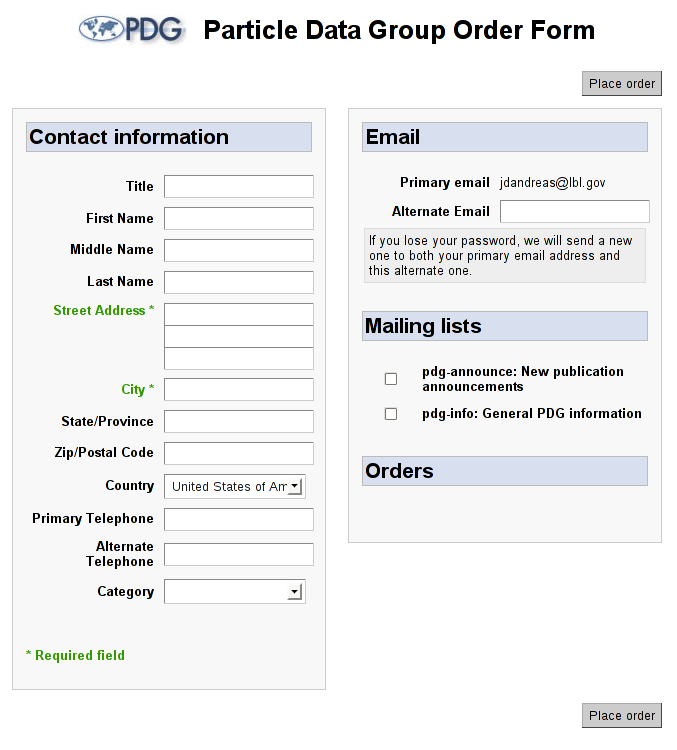
Fig. 1: New user screen
The new user workflow is extremely simple: just an empty form with all of the necessary fields. The user is unable to move on to the confirmation page without completing the necessary fields of this form, and any existing (legacy) user without a listed
street_addr1will be redirected to this form and made to provide one. Once the user has completed this form, he is sent to the same confirmation page that is seen by all returning users.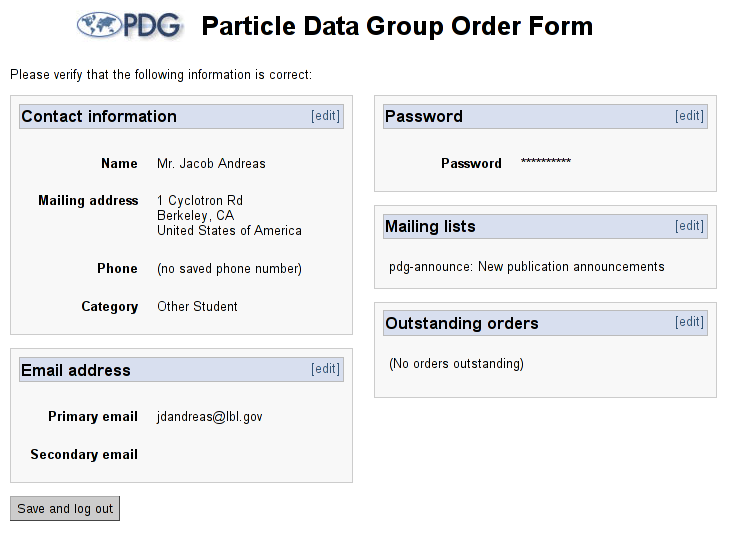
Fig. 2: Returning user screen
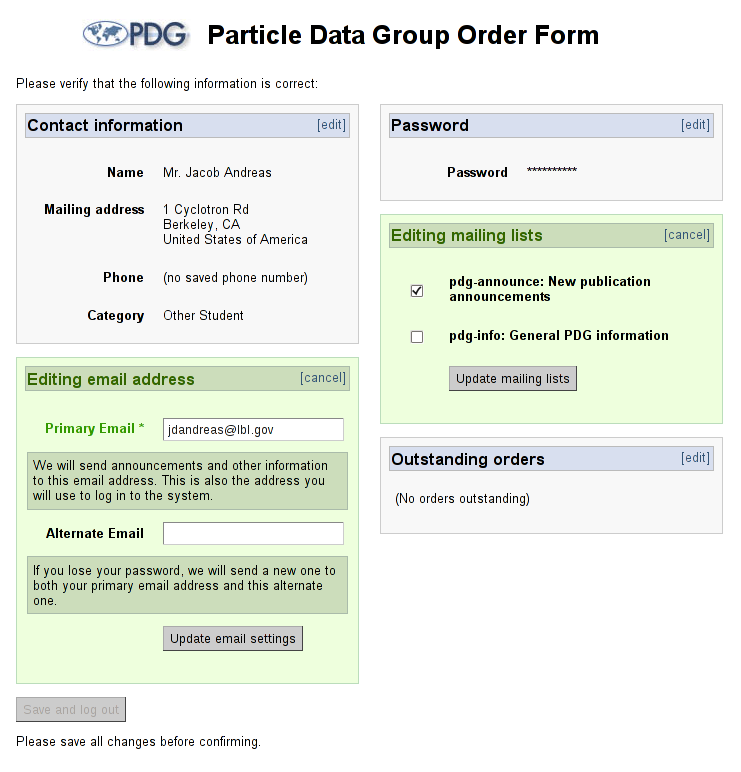
Fig. 3: Settings editing detail
The returning user confirmation page initially displays all of the user's entered information as static text. The settings are broken up into contact, email, password, subscription and mailing list sections, and each section has an "edit" link near the top. When the edit link is pressed, the static text for that section is dynamically replaced with a set of editable fields with "cancel" and "save" buttons -- this way, it is possible for users to do quick, small-scale edits of their settings without having to see the whole settings form again.
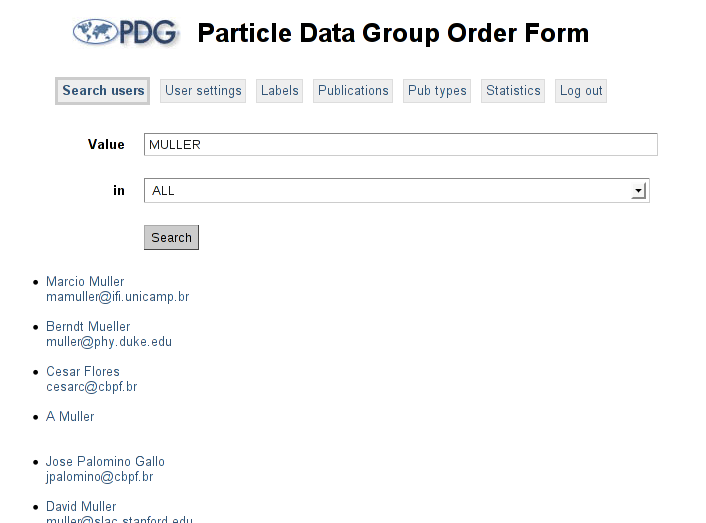
Fig. 4: Search page
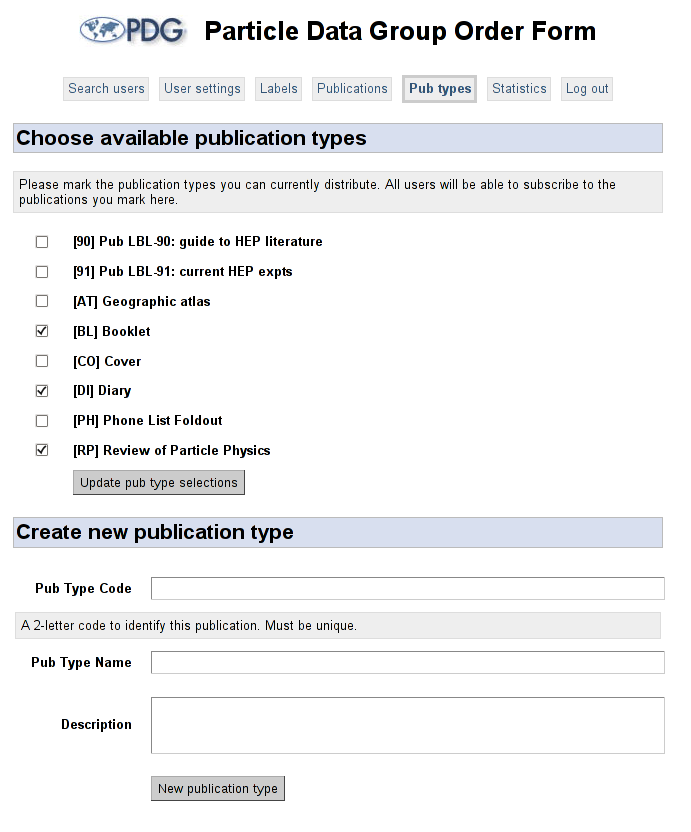
Fig. 5: Publication type management detail
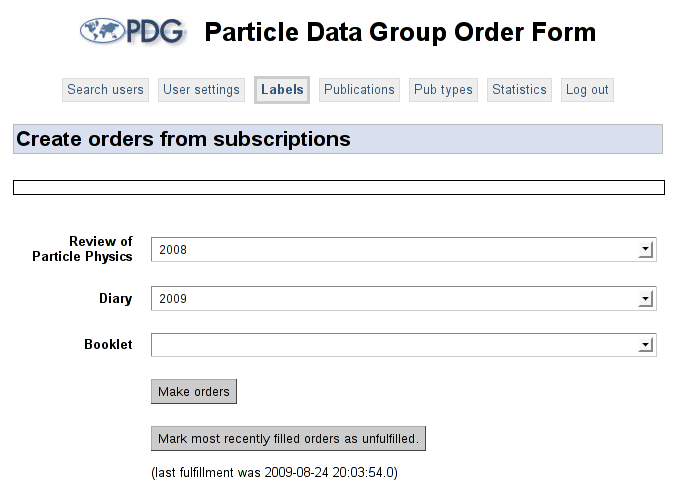
Fig. 6: Label printing in progress
In addition to these two standard workflows, the ordering system contains a tabbed control panel for the system administrator. From this control panel, the adminstrator can create new publications and publication types, write descriptions of the publications, modify individual user settings and print publication mailing labels. The administrator's settings tab reuses the same JSP fragements as the returning user screen, and each of the administration tabs is backed by a separate ActionBean.
-
Username and password management
Because the ordering system is backed by the same
persondatabase that stores user information for the PDG's internal workspace, and because PDG authors must also manage their personal subscriptions through the ordering system, the system must be capable of handling authentication for members both of the public and of the PDG team. As in the old system, ordinary users log in using their email address and a password; however, users of the PDG workspace have a username distinct from their email address, and must be able to access the system using that username instead.The logical solution is for the system allow email address and username to be set independently for PDG members, and force the two to remain synchronized for members of the general public. As it turns out, this can lead to extremely non-intuitive behavior when handling former readers turned authors. Consider a new member of the PDG, whose email address and username are both alice@hotmail.com Alice has grown accustomed to using her email addresss to log in and wants to continue doing so even though she now has the option to change it. Some time later, Alice abandons her Hotmail account and begins using her official email address (alice@pdg.lbl.gov) for all communication, so she changes her stored email address in the ordering interface. But because she is an encoder, her username will not be automatically changed and she must set it a second time in the username field.
As it may not be obvious to most users that such a step is necessary, the ordering system automatically changes the username with the password if the user is a member of the general public or if the user is a PDG member but has identical username and email address.
-
User settings
User settings management -- the primary function of the ordering system -- is managed by three ActionBeans: SettingsActionBean, EncoderSettingsActionBean and AdminSettingsActionBean. These correspond to the three levels of users (viz., regular users, encoders and administrators) that the system recognizes. Because each level generally has access to all the functionality of the levels below it, these classes inherit from each other like so: AdminSettings extends EncoderSettings extends Settings.
Specifically, encoders (but not regular users) have the ability to change their username independently of their password, and at some point in the future may have access to all their PDGWorkspace settings through the ordering system. Administrators, in turn, have the ability to change settings for any user, and not just their own preferences.
There are two interfaces through which users can change their settings. New users are presented with a single form containing all of their settings -- this is designed to allow them to quickly enter all of their information. Returning users without JavaScript are presented with a slightly different version of the same form.
Administrators and regular returning users, however, see a completely different form. The standard settings page is designed for ease of reading rather than input, and assumes that most users simply wish to double-check the information they have already stored in the system, without making changes.
This form is built out of a number of "fragments" (contact, mailing lists, etc.), each of which comes in both a "static" and "dynamic" flavor. The static version of each fragment is shown by default, and simply displays its content in a read-only format. It also contains an "edit" button in one corner, which swaps it with the dynamic version when clicked. The dynamic fragment then includes a "cancel" button, which will close without saving changes, and a "save" button.
The fragments system is implemented via AJAX. The included settingsbox.js contains all of the client-side code for the settings interface, and SettingsActionBean.java contains all the server-side code. It is particularly important to remember that every AJAX request will be sent to a different instance of the SettingsActionBean, and there can be no communication between them except through the ActionBeanContext.
-
Subscriptions and orders
When new users register for the ordering system, they are given the option of selecting a group of publications for immediate order. They are additionally asked to select a set of publications to which they wish to subscribe (in other words, the publications for which they want to receive not just the next copy, but all future copies.
-
Labels and printing
The administrative "Labels" tab provides an automated workflow for peforming a number of separate processes: (1) creating a TeX file with labels for all the existing orders, (3) rendering that TeX file to a postscript file, and finally (3) sending the postscript file to the printer. We ultimately decided to abandon the old "subscription" model in favor of a system in which users place orders for specific publications. Thus, every time they log on they are presented with a set of checkboxes with both the name and year of all available publications, giving them the option to choose between past, current and future editions of all the books that the PDG ships. The bean that handles the order creation process also ensures that when subscriptions are fulfilled, no subscriber is given a order object for a book they have already purchased.
-
User search
The administrator has the ability to change the settings of any user, and as such needs some mechanism for specifying the user to edit. There are two ways to do this. If the desired user's userid (usually their email address) is known, then this may be directly typed into a field at the top of the screen. Otherwise, the administrator can search in any of the
persontable's columns. The default search performs a case-insensitive lookup in all of the string columns, but specific columns (even those with non-string values) can be selected using a drop-down menu at the top of the search page. SQL wildcards, i.e._and%, can be used for any String column.
-
-
Mailing list management
In order to simplify the process of sending mail to subscribers, the ordering system does not contain a native mail client. Instead, it is integrated with the PDG's existing mailman installation using a set of python scripts — this way, administrators can use all of the list management tools mailman provides, while still using the ordering system to automatically manage list membership.
The interface between the ordering system and mailman consists (at present) of three scripts:
mailman-sync-lists.py,mailman-mark-bounces.pyandmailman-update-all.py. The function of each is described below.Rather than writing directly to mailman configuration files, these utility scripts in turn call various mailman helper programs (found in
/var/lib/mailman/binin most distributions) to perform the synchronization. This guarantees that the mailman interface will continue to work, even if mailman changes the format in which its mailing lists are stored.mailman-sync-lists.py
Usage:
./mailman-sync-lists.py <list name>Mailman is not backed by an SQL server, but instead stores all of its email address lists in python pickle files. Because all of the ordering system's emails are stored as database records, some tool is necessary to bring them in sync. That tool is
sync-lists.py, which regenerates mailman's list of subscribers out of the PostgreSQL database. It first generates a temporary text file containing a list of all subscribed users, and then passes that file to the mailman utilitysync_members.mailman-mark-bounces.py
Usage:
./mailman-mark-bounces.py <list name>Mailman has a fine-grained control system for bounce management, and can identify bad email addresses according to various paramenters. In order to make information about these bounces accessible through the PDG API, it must be added back into the database. This script reads the output of the python utility
list_members, identifying the email addresses mailman has marked as bounces and setting theemail1_bouncedcolumn totruein the corresponding person record.mailman-sync-all.py
Usage:
./mailman-sync-all.pyFetches the names of all the mailing lists from the database, and runs
mailman-sync-lists.pyand thenmailman-mark-bounces.pyon each mailing list in turn.
-